
Would you like to add custom code without editing Lennox directly? A child theme is a small theme that sits on top of Lennox and lets you add your own CSS, PHP, or template overrides without changing the parent theme files.
For most beginners, a child theme is only needed when you want to change theme files. If you only want to adjust colors, fonts, spacing, or layouts, the safer first step is to use the Site Editor instead.
When to use a child theme
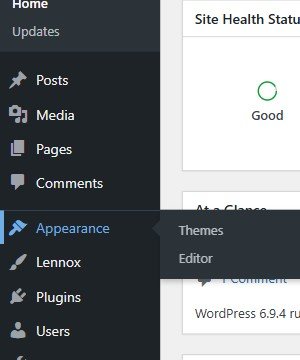
On the verified Lennox site, the visual editing path is Appearance > Editor. When you make changes there, the top-right button shows Save. When nothing is waiting to be saved, it shows Saved.
- Use a child theme when you want to add custom code.
- Use it when you want changes to survive parent theme updates.
- Use it when a tutorial asks you to edit
functions.php,style.css, or template files. - Do not start with a child theme if your goal is only visual styling inside the editor.
The safest beginner path
The lowest-risk approach is to go to Appearance > Editor, try your design changes there first, and click Save if WordPress shows pending changes. Only move to a child theme if you now know you must edit files.
This is the safer beginner option because it avoids code edits and keeps you inside the verified Lennox block-theme workflow.
If you really need a child theme
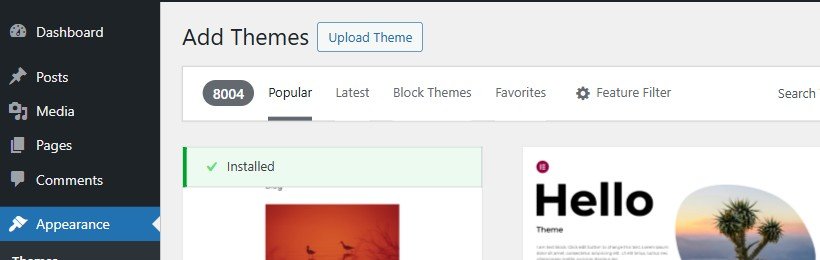
The verified admin path for adding theme files is Appearance > Themes, then Add Theme, then Upload Theme. WordPress can upload a child theme zip, but it does not create the child theme for you.
The file requirements below are based on Lennox code in this workspace:
- Your child theme needs its own folder.
- Your child theme
style.cssmust point to the parent withTemplate: lennox. - If you want the parent theme's main
style.cssrules to keep loading, add a child-themefunctions.phpthat enqueues the parent stylesheet.
/*
Theme Name: Lennox Child
Template: lennox
Text Domain: lennox-child
*/
<?php
add_action( 'wp_enqueue_scripts', function() {
wp_enqueue_style(
'lennox-parent-style',
get_template_directory_uri() . '/style.css',
array(),
wp_get_theme( 'lennox' )->get( 'Version' )
);
}, 20 );Why this extra step matters for Lennox: in the parent theme, functions.php loads the active theme stylesheet with get_stylesheet_uri(). In a child-theme setup, that points to the child theme's style.css, not the parent file. Lennox also loads shared styles separately, but the parent style.css still contains front-end rules you probably do not want to lose.
That's it. If you are unsure whether your next change belongs in the Editor or in a child theme, choose the Editor first. It is the safer beginner option.